Creating & Securing A Webhook
Learn to create and secure webhooks with HMAC-SHA256 signatures, timestamps, and protection against replay attacks. Visualize and debug webhook using Peeko.
Overview
This article explores the anatomy of a webhook. How we create, secure and consume webhooks. Additionally, we showcase how to visualize and debug webhooks using a tool called Peeko.
What is a Webhook?
By definition, a webhook is an automated message sent from one application to another in real-time when a event happens.
For example, when a user places an order, a webhook can be sent to a customer service application to update the user’s order status which could then result in a communication method being emitted such as email or SMS.
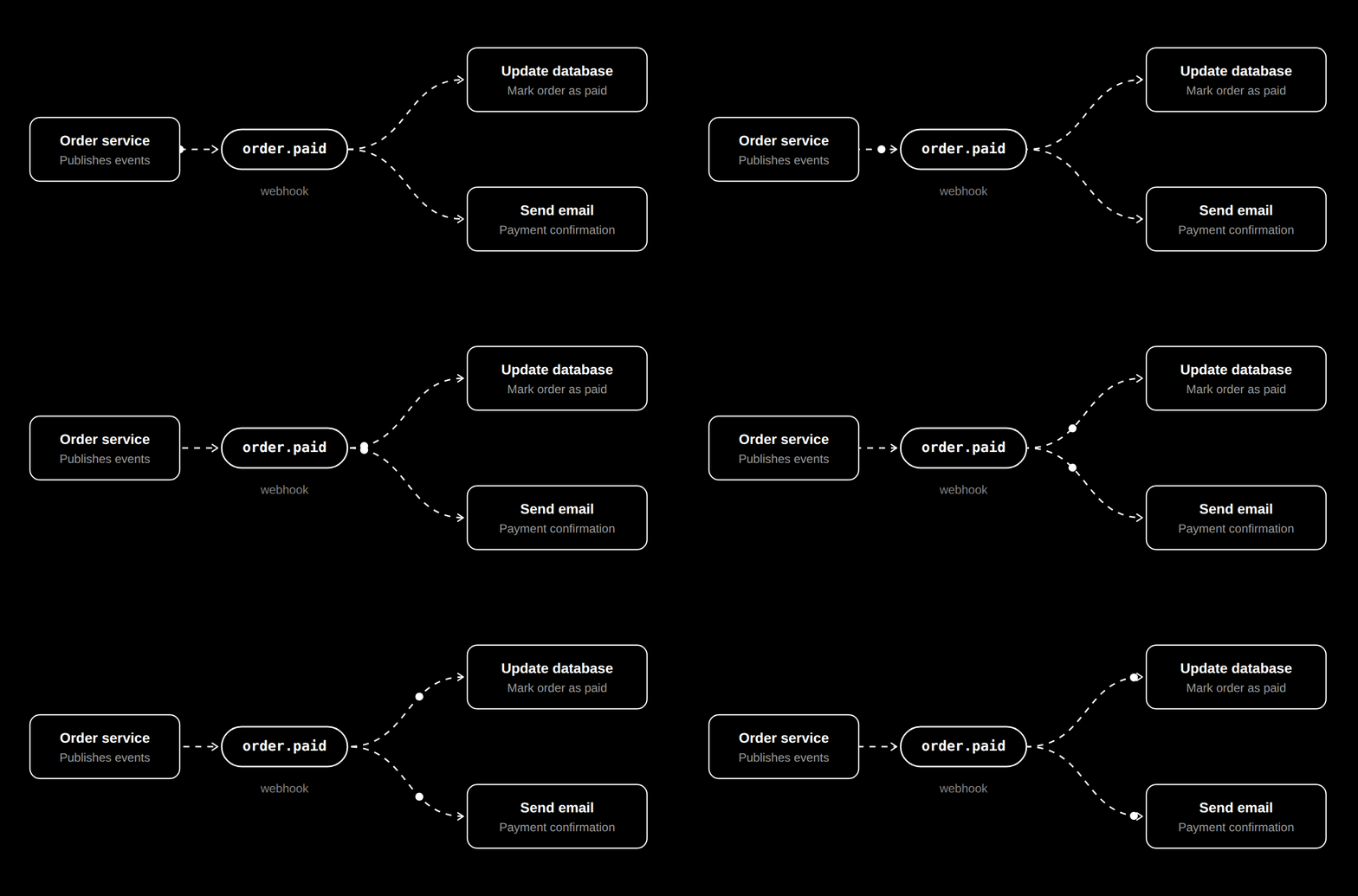
Webhook Anatomy
A webhook is typically a simple HTTP request (often POST) with a JSON payload and a set of headers used for security.
The payload contains the necessary metadata about the event, such as the event_id and an event_type (e.g. order.paid order.updated).
The headers provide security-related information about the webhook. Commonly, one header contains the webhook’s signature, while another includes a timestamp indicating when the webhook was sent.
X-Webhook-Signature - the webhook signature
X-Webhook-Timestamp - the timestamp of the webhook
Example Webhook
curl -X POST \
  -H "X-Webhook-Signature: a1b2c3d4e5f6g7h8i9j0k1l2m3n4o5p6q7r8s9t0u1v2w3x4y5z6a7b8c9d0e1f2" \
  -H "X-Webhook-Timestamp: 1609459200" \
  -d '{"event_id": "123456", "event_type": "order.success"}' \
  https://example.com/api/v1/events
Webhook Security
It is very important to secure webhooks to prevent unauthorized access and ensure the integrity of the data being sent.
Shared Secret
A secret is used to sign webhooks, and is later used to validate the received signature on consumption.
This secret is shared across any applications emitting or consuming the webhooks.
A secret is defined as a random string value.
openssl rand -base64 32 - can be used to create a random base-64 string.
Signature
There are various methods to construct a webhook signature.
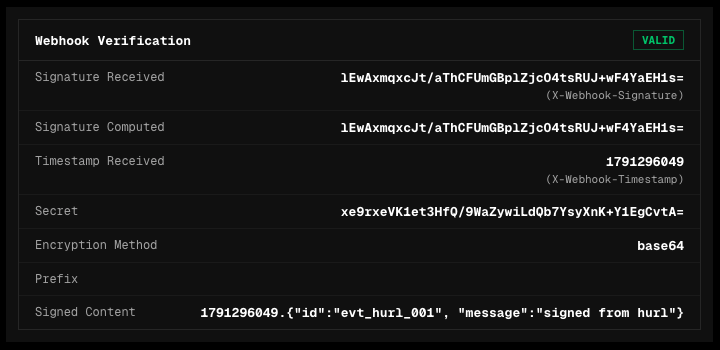
A common pattern is to append the timestamp (UNIX format - 1609459200) and the payload and then hash the output with the secret using an algorithm such as HMAC-SHA256.
Append: `{{timestamp}}.{{payload}}`
Hash: `HMAC-SHA256(secret, {{timestamp}}.{{payload}})`
We then send this signature as a header in the webhook request - X-Webhook-Signature.
Timestamp
In addition to the signature, a header containing the timestamp of the request X-Webhook-Timestamp is sent to ensure the request cannot be replayed at a later date. This is known as a replay attack.
A replay attack occurs when a malicious actor captures a legitimate webhook request and resends it at a later time.
Since the request and signature are valid, the receiving service may process the same event multiple times, potentially causing duplicate actions such as repeated payments or duplicated records.
To mitigate this, the timestamp is included as part of the webhook request and is validated on consumption. If the timestamp falls outside of an acceptable time window (e.g. 5 minutes), the request is rejected. This ensures that even if a webhook request is intercepted, it cannot be replayed indefinitely.
Event / Webhook ID
Additionally, webhooks should include a unique identifier event_id or webhook_id to prevent duplicate events from being processed. This is important because webhooks may be delivered more than once, and ensuring each event is uniquely identified helps avoid handling the same event multiple times.
What is HMAC-SHA256?
HMAC-SHA256 is a hashing algorithm that takes a secret and a message, and then applies the hash function to create a cryptographically secure output.
We use it to create a signature for our webhook, and the process can be mimicked when consuming the webhook to ensure the validity of the signature.
Debugging Webhooks
When working with third-party services like Stripe, validating incoming webhooks is straightforward, as they typically provide libraries with built-in methods for securely consuming and verifying webhook events.
What if you’re the service emitting webhooks?
How can you test / observe that the webhook you’re emitting have the necessary headers and a valid signature?
For this use case I built a tiny self-hosted HTTP inspector called Peeko.
Peeko lets you inspect any request sent to it. Peeko can also be configured to read specific webhook headers and re-compute signatures to verify whether a webhook is valid.
Conclusion
In conclusion we explored the anatomy of a webhook, how to create and consume them, and the best practices for securing webhook communication.
Additionally, we demonstrated how to debug and validate webhooks using Peeko.