Go & Cassandra: Designing a High Write Throughput System
Learn how to design a high-write-throughput messaging system using Go and Cassandra. This guide covers query-first table design, keyspaces, migrations, and K6 load testing results showing 33k+ writes per second.

In this article, we show how to use Cassandra, a high-write-throughput database, with Go to handle large volumes of write traffic. We will mimic a message-handling service like WhatsApp, which must process a high number of write requests per second.
We will also demonstrate how to design Cassandra tables with a query-first mindset to keep queries fast and efficient, and how to run migrations to set up those tables.
What is Cassandra?
Cassandra is a database optimised for high write throughput. It is used by companies such as Monzo to handle a high number of writes per second. Later, we will demonstrate Cassandra’s strengths through load testing.
Cassandra is a NoSQL database. It does not support transactions or joins. It is designed to be modelled with a query-first mindset. How you will read and write the data efficiently?
In this example, we focus on writing and retrieving messages for a conversation in an app like WhatsApp. How do we handle large numbers of users sending messages? This is an intense, high-write-throughput scenario that is a great fit for Cassandra.
Tables in Cassandra require a PRIMARY KEY for each row. A PRIMARY KEY is made up of a PARTITION KEY and an optional CLUSTERING KEY.
PARTITION KEY: This partitions the data within Cassandra.
CLUSTERING KEY: This sorts the data within a partition.
Below is how we set up our messages table:
CREATE TABLE IF NOT EXISTS messages (
    conversation_id UUID,
    message_id TIMEUUID,
    sender_id UUID,
    content TEXT,
    PRIMARY KEY (conversation_id, message_id)
) WITH CLUSTERING ORDER BY (message_id DESC);
Above, you can see that our PRIMARY KEY is made up of conversation_id, which partitions the data by conversation, and message_id with a TIMEUUID data type, which sorts messages so the most recent appear first. This is especially useful in our use case, where users typically want to see the latest messages in a conversation.
TIMEUUID is a special Cassandra data type that embeds a timestamp into the UUID, so we can determine when the row was created.
Cassandra Setup
As we mentioned earlier, Cassandra requires migrations to set up tables in the KEY SPACE. In our project, we use a separate Go binary to create the KEY SPACE and run our migrations.
What is a KEY SPACE?
In Cassandra, a KEY SPACE is the top-level namespace for organising data. Each KEY SPACE contains tables and defines how data is replicated across the cluster.
When creating a KEY SPACE, you must specify a replication strategy and replication factor:
-
Replication Strategy: Determines how replicas are distributed across nodes. For production,
NetworkTopologyStrategyis recommended as it allows you to configure replication per data centre. For development,SimpleStrategysuffices.SimpleStrategyis the simplest replication strategy and is intended for single-data-centre or local development setups.It places replicas by walking clockwise around the ring from the partition’s primary node until the configured
replication_factoris met. It does not let you set replication per data centre, so it is not recommended for multi-data-centre production clusters. -
Replication Factor: The number of copies of each piece of data maintained across the cluster. A replication factor of 3 means each piece of data is stored on 3 different nodes, providing fault tolerance if nodes fail.
Here’s an example of creating a KEY SPACE:
CREATE KEYSPACE IF NOT EXISTS messages_keyspace
WITH replication = {
    'class': 'SimpleStrategy',
    'replication_factor': 3
};
This configuration ensures that if one or two nodes go down, your data remains accessible through the remaining replicas. The replication factor affects both availability and write performance. A higher replication factor means more nodes must acknowledge writes, but it also provides better fault tolerance.
Endpoints & Queries
| Endpoint | Query | Notes |
|---|---|---|
POST/api/v1/conversations/{conversation_id}/messages | INSERT INTO messages (message_id, conversation_id, sender_id, content)VALUES (?, ?, ?, ?) | |
GET/api/v1/conversations/{conversation_id}/messages | SELECT message_id, conversation_id, sender_id, contentFROM messagesWHERE conversation_id = ?LIMIT ? | Messages are ordered by most recent because message_id is the clustering key. |
DELETE/api/v1/conversations/{conversation_id}/messages/{message_id} | DELETE FROM messagesWHERE conversation_id = ?AND message_id = ? | Both conversation_id and message_id are required to identify the row. |
Load Testing - K6
Now that we understand how our API interacts with Cassandra, we can benchmark its write throughput with a K6 load test.
Run the test
- Start the services:
docker compose up --build -d
- Run the load test from the
Makefile:make run-load
This test stresses the POST /api/v1/conversations/{conversation_id}/messages endpoint and mimics a high-write workload.
Results
2000 Virtual Users - 10 seconds
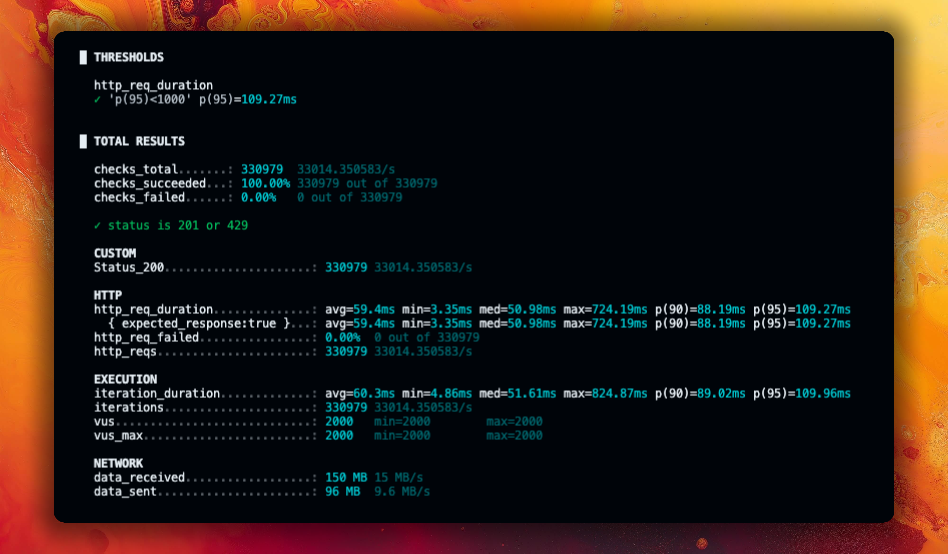
In this run, the service handled 330,979 requests at an average of 33,014 requests per second. Most importantly, 100% of requests succeeded, showing that Cassandra sustained the write load without errors.
Conclusion
In this article, we showed how Cassandra’s write-optimised design makes it a strong fit for high-volume messaging systems. By modelling tables around access patterns and validating performance with K6, we demonstrated an approach that can sustain large bursts of traffic while keeping reads predictable and fast.