Can AI Agents Solve a Rubik's Cube?
Agent Cube tests whether an AI agent can solve a Rubik's Cube using tools to inspect and rotate it. Agents are built with Google's Agent Development Kit (ADK) and routed through OpenRouter, making it easy to test different LLMs.
TL;DR
Agent Cube is a project that tests whether an AI Agent can solve a Rubik’s Cube using tools to inspect and rotate it.
Agents are built with Google’s Agent Development Kit (ADK) and routed through OpenRouter, making it easy to test different LLMs.
Check out the Agent Cube repository on GitHub or watch the demo video below.
What Is Agent Cube?
Agent Cube was built to answer a simple question.
Can an LLM solve a Rubik’s Cube?
But we cannot just give an agent and expect it to rotate and explain its moves. We need a common language that we can use the determine what to reotate and the current dtate of ther ubiks cube. Additioanlly, the tools given to the agent need to communicate with this common language.
This problem is solved using Rubik’s Cube notation to define the state of a Rubik’s Cube and the available options to rotate the cube.
Rubiks Cube Notation
Rubik’s Cube notation was popularized by David Singmaster in 1981 in his book Notes on Rubik’s Magic Cube.
Rubik’s Cube notation has been standard since then, so LLMs have plenty of training data to understand and use it. In order to provide full observability to the LLMs two key components were required. Rotation Notation & Piece Notation.
Rotation Notation
Rotations are denoted after the face they turn.
U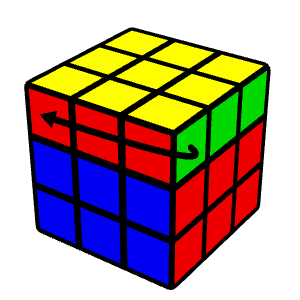 upper upper | D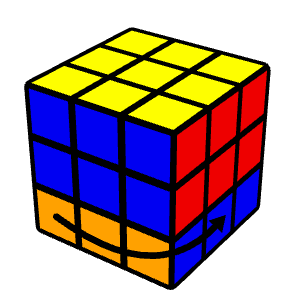 down down | R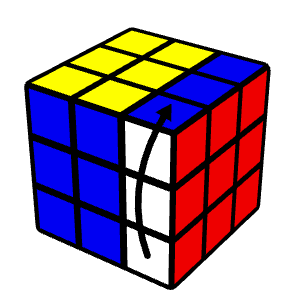 right right |
L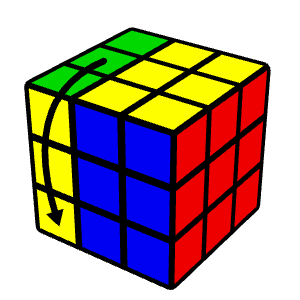 left left | F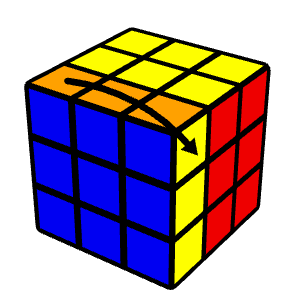 front front | B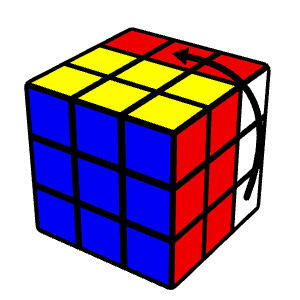 back back |
U’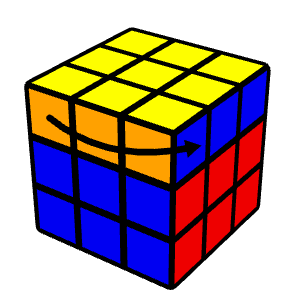 upper upper | D’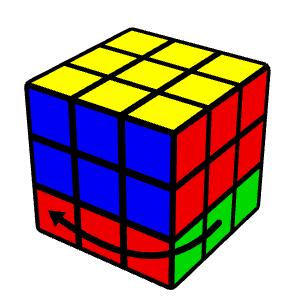 down down | R’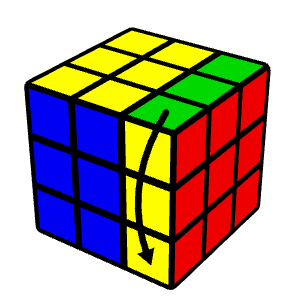 right right |
L’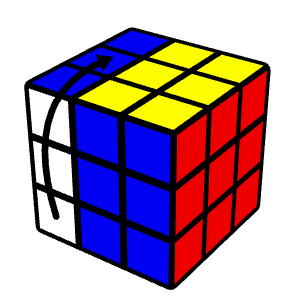 left left | F’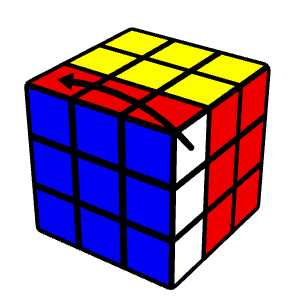 front front | B’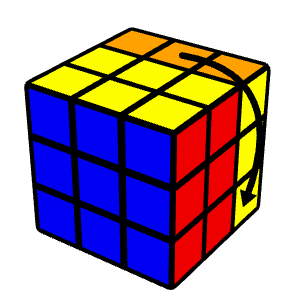 back back |
All rotation diagrams were sourced from [1]
Piece Notation
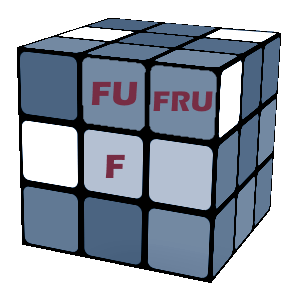 Piece Notation [2] — Visual breakdown of centre, edge, and corner piece naming based on face stickers. | Pieces are named after the faces they touch. The letters tell you which face stickers are on that piece. |
The Agent
With the notation defined, we have a language that we can use to provide the state of the cube and the available rotations.
The agent was built using Google’s Agent Development Kit (ADK), which provides a structured framework for tool-augmented LLM interactions. The agent is given a set of tools to inspect and rotate the cube.
To fairly compare different models, all LLM requests are routed through OpenRouter, so any supported model can attempt the same solve under identical conditions.
Below are the tools provided to the agent.
Tools
| Name | Description |
|---|---|
get_cube | Get the current state of a Rubik’s cube. |
rotate_cube | Apply a rotation to a Rubik’s cube. |
is_cube_solved | Check if a Rubik’s cube is solved. |
get_solved_example | Get the example solved Rubik’s cube state. |
set_cube_as_completed | Mark a Rubik’s cube as completed once it has been solved. |
Rubik’s Cube State
Using the piece notation structure outlined above, get_cube returns the cube’s full state as a JSON object:
{
  "centers": {
    "F": { "stickers": { "F": "Green" } },
    "B": { "stickers": { "B": "Blue" } },
    "R": { "stickers": { "R": "Red" } },
    "L": { "stickers": { "L": "Orange" } },
    "U": { "stickers": { "U": "White" } },
    "D": { "stickers": { "D": "Yellow" } }
  },
  "edges": {
    "UF": { "stickers": { "U": "White", "F": "Green" } },
    "UR": { "stickers": { "U": "White", "R": "Red" } },
    "UB": { "stickers": { "U": "White", "B": "Blue" } },
    "UL": { "stickers": { "U": "White", "L": "Orange" } },
    "FR": { "stickers": { "F": "Green", "R": "Red" } },
    "FL": { "stickers": { "F": "Green", "L": "Orange" } },
    "BR": { "stickers": { "B": "Blue", "R": "Red" } },
    "BL": { "stickers": { "B": "Blue", "L": "Orange" } },
    "DF": { "stickers": { "D": "Yellow", "F": "Green" } },
    "DR": { "stickers": { "D": "Yellow", "R": "Red" } },
    "DB": { "stickers": { "D": "Yellow", "B": "Blue" } },
    "DL": { "stickers": { "D": "Yellow", "L": "Orange" } }
  },
  "corners": {
    "UFR": { "stickers": { "U": "White", "F": "Green", "R": "Red" } },
    "URB": { "stickers": { "U": "White", "R": "Red", "B": "Blue" } },
    "UBL": { "stickers": { "U": "White", "B": "Blue", "L": "Orange" } },
    "ULF": { "stickers": { "U": "White", "L": "Orange", "F": "Green" } },
    "DFR": { "stickers": { "D": "Yellow", "F": "Green", "R": "Red" } },
    "DRB": { "stickers": { "D": "Yellow", "R": "Red", "B": "Blue" } },
    "DBL": { "stickers": { "D": "Yellow", "B": "Blue", "L": "Orange" } },
    "DLF": { "stickers": { "D": "Yellow", "L": "Orange", "F": "Green" } }
  }
}
This aligns with the piece notation above.
Each centre, edge, and corner piece is a key in the JSON object, with its stickers mapping each face to a colour.
Example:

UFR = Up & Front & Right faces.

U = White Sticker
F = Green Sticker
R = Red Sticker
Jev Mode
Agent Cube can also run using System One models like Jev.
In Jev mode there is no agent reasoning or planned algorithm. On each iteration we send the Rubik’s Cube’s current state, the solved reference state and recent move history, and ask a single choice question:
next_rotation
Jev picks one of the 12 valid rotations. The rotation is applied and the state of the cube is checked is_cube_solved, and repeat until the cube is solved or the step / time budget is exceeded.
Notably, Jev never sees the scramble rotation sequence — only the rotations it has applied in previous iterations.
Each iteration sends model, state, and questions.
state - holds all facts Jev is allowed to decide from.
questions.next_rotation - a choice primitive with instructions and per-option criteria:
Example Request:
{
  "model": "typesafe/jev-1.13",
  "state": {
    "cube_id": "68e1a2b3c4d5e6f7a8b9c0d1",
    "move_number": 7,
    "current": {
      "centers": {
        "F": { "stickers": { "F": "green" } },
        "B": { "stickers": { "B": "blue" } },
        "U": { "stickers": { "U": "white" } },
        "D": { "stickers": { "D": "yellow" } },
        "L": { "stickers": { "L": "orange" } },
        "R": { "stickers": { "R": "red" } }
      },
      "edges": {
        "UF": { "stickers": { "U": "green", "F": "white" } },
        "UR": { "stickers": { "U": "white", "R": "red" } },
        "UB": { "stickers": { "U": "white", "B": "blue" } },
        "UL": { "stickers": { "U": "white", "L": "orange" } },
        "FR": { "stickers": { "F": "green", "R": "red" } },
        "FL": { "stickers": { "F": "blue", "L": "orange" } },
        "BR": { "stickers": { "B": "blue", "R": "red" } },
        "BL": { "stickers": { "B": "blue", "L": "orange" } },
        "DF": { "stickers": { "D": "yellow", "F": "green" } },
        "DR": { "stickers": { "D": "yellow", "R": "red" } },
        "DB": { "stickers": { "D": "yellow", "B": "blue" } },
        "DL": { "stickers": { "D": "yellow", "L": "orange" } }
      },
      "corners": {
        "UFR": { "stickers": { "U": "white", "F": "green", "R": "red" } },
        "URB": { "stickers": { "U": "white", "R": "red", "B": "blue" } },
        "UBL": { "stickers": { "U": "white", "B": "blue", "L": "orange" } },
        "ULF": { "stickers": { "U": "white", "L": "orange", "F": "green" } },
        "DFR": { "stickers": { "D": "yellow", "F": "green", "R": "red" } },
        "DRB": { "stickers": { "D": "yellow", "R": "red", "B": "blue" } },
        "DBL": { "stickers": { "D": "yellow", "B": "blue", "L": "orange" } },
        "DLF": { "stickers": { "D": "yellow", "L": "orange", "F": "green" } }
      }
    },
    "solved_example": {
      "centers": {
        "F": { "stickers": { "F": "green" } },
        "B": { "stickers": { "B": "blue" } },
        "U": { "stickers": { "U": "white" } },
        "D": { "stickers": { "D": "yellow" } },
        "L": { "stickers": { "L": "orange" } },
        "R": { "stickers": { "R": "red" } }
      },
      "edges": {
        "UF": { "stickers": { "U": "white", "F": "green" } },
        "UR": { "stickers": { "U": "white", "R": "red" } },
        "UB": { "stickers": { "U": "white", "B": "blue" } },
        "UL": { "stickers": { "U": "white", "L": "orange" } },
        "FR": { "stickers": { "F": "green", "R": "red" } },
        "FL": { "stickers": { "F": "green", "L": "orange" } },
        "BR": { "stickers": { "B": "blue", "R": "red" } },
        "BL": { "stickers": { "B": "blue", "L": "orange" } },
        "DF": { "stickers": { "D": "yellow", "F": "green" } },
        "DR": { "stickers": { "D": "yellow", "R": "red" } },
        "DB": { "stickers": { "D": "yellow", "B": "blue" } },
        "DL": { "stickers": { "D": "yellow", "L": "orange" } }
      },
      "corners": {
        "UFR": { "stickers": { "U": "white", "F": "green", "R": "red" } },
        "URB": { "stickers": { "U": "white", "R": "red", "B": "blue" } },
        "UBL": { "stickers": { "U": "white", "B": "blue", "L": "orange" } },
        "ULF": { "stickers": { "U": "white", "L": "orange", "F": "green" } },
        "DFR": { "stickers": { "D": "yellow", "F": "green", "R": "red" } },
        "DRB": { "stickers": { "D": "yellow", "R": "red", "B": "blue" } },
        "DBL": { "stickers": { "D": "yellow", "B": "blue", "L": "orange" } },
        "DLF": { "stickers": { "D": "yellow", "L": "orange", "F": "green" } }
      }
    },
    "recent_moves": ["R", "U", "F'"],
    "goal": "Solve the cube. Pick the single rotation that fixes the most unsolved pieces compared to the solved example. Do not undo recent moves unless it fixes new pieces.",
    "valid_rotations": ["F", "F'", "B", "B'", "U", "U'", "D", "D'", "L", "L'", "R", "R'"]
  },
  "questions": {
    "next_rotation": {
      "type": "choice",
      "instructions": "Which single rotation best progresses this Rubik's cube toward the solved example? Compare current stickers to the solved example.",
      "criteria": {
        "F": "Front face clockwise: use when front-layer stickers move closer to solved.",
        "F'": "Front face counter-clockwise: use when front-layer stickers move closer to solved.",
        "B": "Back face clockwise: use when back-layer stickers move closer to solved.",
        "B'": "Back face counter-clockwise: use when back-layer stickers move closer to solved.",
        "U": "Up face clockwise: use when top-layer stickers move closer to solved.",
        "U'": "Up face counter-clockwise: use when top-layer stickers move closer to solved.",
        "D": "Down face clockwise: use when bottom-layer stickers move closer to solved.",
        "D'": "Down face counter-clockwise: use when bottom-layer stickers move closer to solved.",
        "L": "Left face clockwise: use when left-layer stickers move closer to solved.",
        "L'": "Left face counter-clockwise: use when left-layer stickers move closer to solved.",
        "R": "Right face clockwise: use when right-layer stickers move closer to solved.",
        "R'": "Right face counter-clockwise: use when right-layer stickers move closer to solved."
      }
    }
  }
}
The Decisions API returns one typed answer per question, plus usage.
For a choice question you get the winning choice, its confidence, and the full probabilities distribution over the options you defined:
Example Response:
{
  "id": "dec_123",
  "model": "typesafe/jev-1.13",
  "answers": {
    "next_rotation": {
      "type": "choice",
      "choice": "F",
      "confidence": 0.82,
      "probabilities": { "F": 0.7, "R": 0.3 }
    }
  },
  "usage": { "input_tokens": 1200, "output_tokens": 50, "cost": 0.001 }
}
From this response, we read the rotation with the highest confidence and apply it to the cube, re-compute the cube state and repeat.
Demo
Below is a demo of the agent in action.
Run It Yourself
Check out the Agent Cube Repository for instructions on how to run the agent yourself.